

Excel sheet not responding usually means the workbook freezes, stops accepting clicks, becomes slow, or shows a “Not Responding” message.
This often happens because of oversized files, formulas, add-ins, memory overload, corrupted workbooks, or calculation bottlenecks.
Why is my Excel sheet not responding?
Common causes:
Large workbook size
Too many formulas or volatile functions
Heavy Pivot Tables or external links
Excel add-ins causing conflicts
Manual or broken calculations
Corrupted workbook file
Too much conditional formatting
Low system memory (RAM)
What is the fastest way to fix an unresponsive Excel sheet?
Wait briefly before force closing.
Large recalculations may temporarily freeze Excel.
If Excel remains frozen:
Save attempt:
Ctrl + S
Then try:
Esc
to interrupt calculations.
Avoid immediately ending the process unless necessary.
How do I open Excel in Safe Mode?
Safe Mode disables add-ins and startup conflicts.
Press:
Windows + R
Type:
excel /safe
Then reopen the workbook.
If performance improves, an add-in is likely causing the issue.
How do I disable problematic add-ins?
Go to:
File → Options → Add-ins
At the bottom:
Manage → COM Add-ins → Go
Disable all add-ins temporarily.
Restart Excel.
Then enable one-by-one to identify the culprit.
How do formulas make Excel freeze?
Heavy formulas create recalculation overload.
Common offenders:
OFFSET()
INDIRECT()
NOW()
TODAY()
RAND()
These are volatile functions and recalculate constantly.
Fix:
Replace OFFSET with:
INDEX()
Limit unnecessary volatile formulas.
How do I fix full-column references slowing Excel?
Problem:
=SUM(A:A)
across thousands of formulas.
Fix:
Use bounded ranges:
=SUM(A2:A5000)
Full-column references are a major performance killer.
How do Pivot Tables cause freezing?
Large Pivot caches slow Excel heavily.
Fix:
Refresh selectively.
Instead of:
Refresh All
refresh only required Pivot Tables.
Also remove unused Pivot caches.
How do I fix external links slowing Excel?
Linked workbooks delay opening and recalculation.
Go to:
Data → Edit Links
Check:
Broken links
Unused links
Slow network paths
Remove unnecessary links.
How do I stop automatic recalculation temporarily?
For very heavy models:
Go to:
Formulas → Calculation Options
Set:
Manual
Then calculate manually:
F9
Useful for large financial models.
Do not forget to switch back later.
How does conditional formatting freeze Excel?
Thousands of rules slow rendering.
Fix:
Home → Conditional Formatting → Manage Rules
Delete duplicate or unnecessary rules.
Keep formatting lightweight.
How do I reduce workbook file size?
Large workbooks become unstable.
Fix:
Delete unused rows and columns
Remove unnecessary formatting
Compress images
Remove hidden sheets and links
Save as:
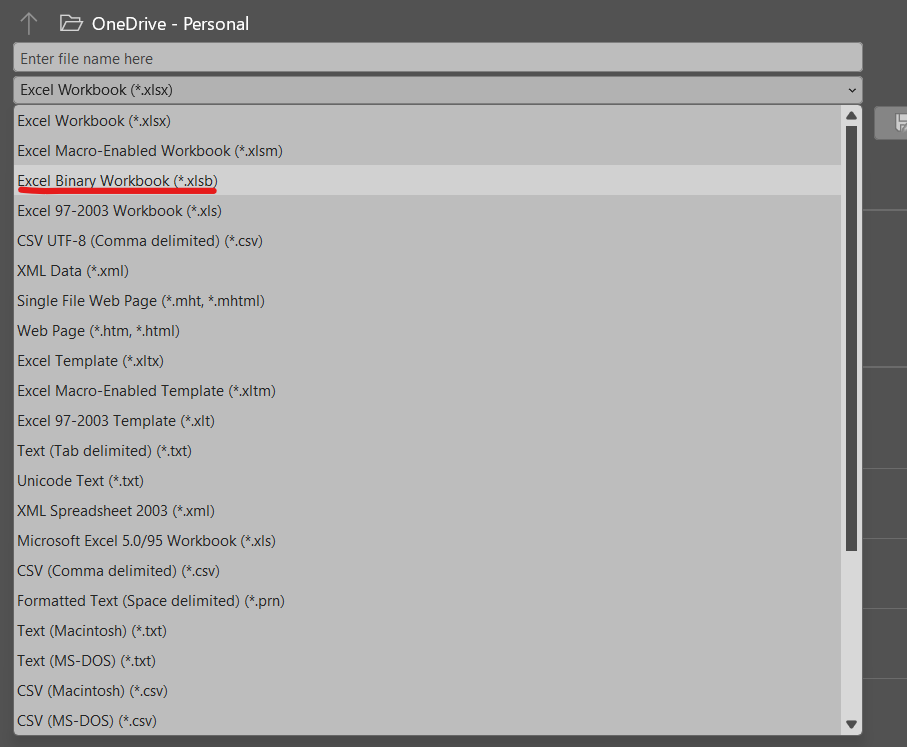
.xlsb
Binary files often perform faster.
How do I repair a corrupted workbook?
Go to:
File → Open
Select workbook →
Open → Open and Repair
Choose:
Repair
first.
How do I fix memory-related freezing?
Close:
Browser tabs
Power BI
Heavy applications
Restart Excel.
Excel performance depends heavily on available RAM.
Why does Excel freeze after filtering or sorting?
Large filtered ranges recalculate formulas heavily.
Fix:
Use Excel Tables.
Or limit formulas to necessary ranges only.
Best methods to fix Excel not responding by use case
| Use Case | Best Fix |
|---|---|
| Add-in conflicts | Safe Mode |
| Large formulas | Limit ranges |
| Volatile formulas | Replace OFFSET/INDIRECT |
| Heavy Pivot Tables | Refresh selectively |
| Workbook corruption | Open and Repair |
| Huge file size | Save as XLSB |
Best practices to avoid Excel freezing
Avoid full-column references
Limit volatile formulas
Use helper columns instead of giant nested formulas
Keep Pivot Tables optimized
Remove unused formatting regularly
Break massive workbooks into smaller files
FAQs
Why is Excel suddenly not responding?
Usually due to recalculation overload, large files, or add-in conflicts.
How do I stop Excel freezing immediately?
Try:
Esc
to interrupt calculations.
Can formulas freeze Excel?
Yes. Volatile functions and large formula chains slow Excel dramatically.
Why does Excel freeze on opening?
Often due to external links, add-ins, or corrupted workbooks.
Does XLSB improve performance?
Yes. Large workbooks often perform faster as:
.xlsb
Should I disable automatic calculation?
For very large models, temporarily yes, but remember to switch it back.
Other Excel Fixes:
- Excel Circular Reference Warning? How To Fix
- Excel Formula Not Calculating? Fix It Fast
- Excel INDEX MATCH Not Working? Complete Fix Guide
- Excel XLOOKUP Not Working? Fix Errors Step-by-Step
More guides added daily.